
You’ve heard the stories. A MacBook that lasts all day on a single charge. A trackpad that feels like magic. An operating system that never gets in your way. A laptop that still feels fast five years after you bought it.
But here’s the problem. Apple’s MacBook lineup has expanded, and the prices have gone up. The MacBook Air, MacBook Neo, MacBook Pro — which one is actually right for you? Pay too little, and you might end up with a machine that can’t handle your workload. Pay too much, and you’ve wasted money on power you’ll never use.
This guide cuts through the confusion. Whether you’re a student, a creative professional, a business user, or someone who just wants a reliable laptop that works beautifully, each MacBook here is chosen based on real-world usability, not just specs. By the end, you’ll know exactly which MacBook fits your workflow, your budget, and your life.
🏆 Top Pick
Apple MacBook Air 13-inch M5 – Best Overall MacBook for Most Users
Here’s the thing about the MacBook Air M5. It’s not the cheapest MacBook. It’s not the most powerful. But for the vast majority of people — students, professionals, writers, travelers, everyday users — it hits the sweet spot perfectly.
The M5 chip delivers smooth, responsive performance for everything from daily productivity to light creative work. The battery lasts through a full day of real use. The design is thin, light, and portable without feeling fragile. And the price, while not cheap, is reasonable for what you get.
Most people don’t need a MacBook Pro. Most people shouldn’t buy the cheapest option and hope for the best. Most people should buy the MacBook Air M5 — because it’s the one that does everything well without making you pay for power you’ll never use.
If you want one option that does everything reliably without overthinking, this is the one to go for.
📊 Comparison Table
| Product | Key Feature | Best For | Action |
|---|---|---|---|
| Apple MacBook Air 13-inch M5 | M5 chip + 18-hour battery | Everyday users & professionals | Check Price |
| Apple MacBook Neo 13-inch | A18 Pro chip + budget price | Students & casual use | Check Price |
| Apple MacBook Pro 14-inch M4 Pro | M4 Pro chip + XDR display | Creators & professionals | Check Price |
Apple MacBook Air 13-inch M5 – Best Balance of Power and Portability
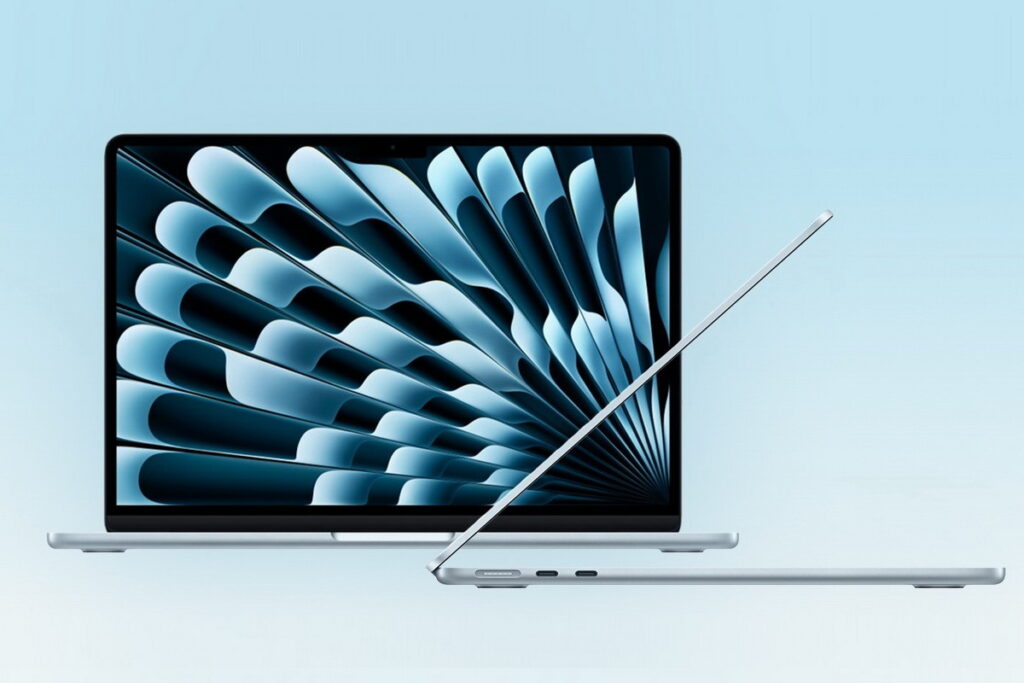
Overview
Imagine starting your day at a coffee shop, pulling your laptop out of your bag, and opening it instantly. No waiting for it to wake up. No fan noise disturbing the quiet. Just you and your work, immediately.
That’s the daily reality with the MacBook Air M5. The M5 chip makes everything feel instant — apps open quickly, switching between tasks is smooth, and even light creative work like photo editing runs surprisingly well for such a thin laptop. The battery is the real star here. Eighteen hours isn’t just marketing — you can actually work a full day, then stream something at night, and still not reach for the charger until the next morning.
The design is iconic for a reason. It’s thin enough to slip into any bag, light enough that you forget you’re carrying it, and solid enough that it never feels fragile. The keyboard is comfortable for long typing sessions. The trackpad is best-in-class. And the display — while not as stunning as the Pro’s XDR screen — is bright, sharp, and pleasant to look at for hours.
It’s not for heavy video editing. It’s not for 3D rendering. But for the other 95% of what people actually do on laptops — writing, browsing, email, video calls, presentations, light creative work — the MacBook Air M5 is fast, portable, and an absolute joy to use.
Key Features
- Apple M5 chip
- 16GB unified memory
- 512GB SSD
- 18-hour battery life
- 13.6-inch Liquid Retina display
- Silent fanless design
- MagSafe charging
- Two Thunderbolt ports
✅ PROS
- Extremely smooth performance for daily work and multitasking – You can have a dozen tabs open, Spotify playing, a video call running, and a document you’re editing. Everything stays responsive. No stuttering, no waiting.
- Long battery life supports full-day usage without charging – Start work at 9 AM, take breaks, attend meetings, write emails, and you’ll still have battery left at 6 PM. For travelers and students, that freedom changes how you work.
- Lightweight design makes it perfect for portability – At under three pounds, you can carry this laptop everywhere without thinking about it. It disappears into your bag until you need it.
- Silent operation with no fan noise – Because there’s no fan, the laptop is completely silent. No whirring, no jet engine sounds during video calls. Just quiet productivity.
❌ CONS
- Not ideal for heavy professional workloads like 4K video editing – The M5 chip is powerful, but it’s not a Pro chip. If you edit video daily, work with large 3D models, or run intensive development environments, the Air will feel limited.
- Limited upgrade options after purchase – Everything is soldered. What you buy is what you get. Make sure you choose enough RAM and storage at purchase because you cannot upgrade later.
- Only two Thunderbolt ports – If you need to connect multiple external displays, hard drives, and accessories simultaneously, you’ll need a dongle or hub.
🎯 Best For
Students – You need a laptop for classes, research, papers, and streaming. You carry it across campus every day. You need all-day battery life. The MacBook Air M5 fits your life perfectly.
Professionals and office workers – You spend your days in email, documents, presentations, and video calls. You don’t need Pro power, but you want a laptop that feels fast and premium. This is it.
Travelers and remote workers – You work from coffee shops, hotels, and airplanes. Portability and battery life matter more than raw power. The Air M5 is the perfect travel companion.
Writers and researchers – The comfortable keyboard, excellent trackpad, and silent operation make this a dream for anyone who spends hours typing and reading.
🧠 Why We Recommend It
The MacBook Air M5 offers the best balance of performance, portability, and usability for most users. It’s not the cheapest MacBook, but it’s the one that hits the sweet spot — enough power for real work, portability for real life, and battery life that actually lasts.
For students, professionals, and everyday users who want a fast, portable, reliable laptop, the MacBook Air M5 is the smartest choice Apple offers.
If this matches what you’re looking for, there’s no need to overthink — this option already covers everything most users need.
Apple MacBook Neo 13-inch – Best Budget-Friendly MacBook
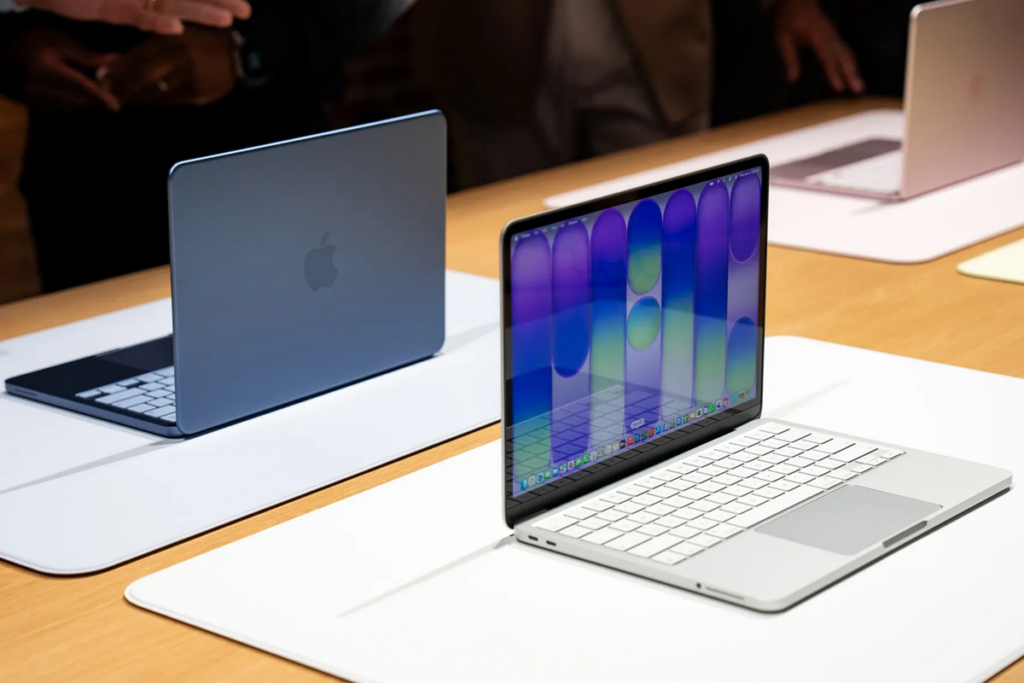
Overview
You want a Mac. You love macOS. You’re in the Apple ecosystem with an iPhone and maybe an iPad. But you don’t have $1,200 to spend on a laptop. Maybe you’re a student on a tight budget. Maybe you’re buying a first laptop for a family member. Maybe you just don’t want to overspend on power you’ll never use.
The MacBook Neo is your answer. The A18 Pro chip delivers smooth performance for everyday tasks — browsing, email, documents, streaming, even light photo editing. The battery easily lasts through a full day. The design is classic Apple — thin, light, and premium-feeling.
It’s not for heavy workloads. Don’t try to edit 4K video or run demanding creative software. But for the basics — for the millions of people who use laptops for email, web, documents, and media — the MacBook Neo delivers the Mac experience at the lowest possible entry price.
This is the Mac for people who want a Mac but don’t need a powerhouse. And for those people, it’s a fantastic value.
Key Features
- Apple A18 Pro chip
- 8GB unified memory
- 256GB SSD
- 13-inch Liquid Retina display
- macOS with full Apple ecosystem integration
- Lightweight portable design
✅ PROS
- Smooth performance for everyday tasks – Browsing, email, documents, streaming, video calls — everything you do daily runs smoothly. The A18 Pro chip is more than capable for normal use.
- Good battery life for all-day use – You’ll get through a full day of classes, work, or travel without hunting for an outlet. That reliability matters when you’re on the go.
- Lightweight and easy to carry anywhere – Slip it into any bag. The MacBook Neo is portable enough that you’ll never think twice about bringing it with you.
- Most affordable way to get a modern Mac – If budget is your priority but you still want macOS and Apple build quality, this is the entry point.
❌ CONS
- Limited RAM (8GB) for heavy multitasking – Keep your tab count reasonable. If you’re the type who has 30 tabs open while running multiple apps, you’ll feel the limitations.
- Limited storage (256GB) fills up quickly – After macOS and basic apps, you’ll have limited space left. Plan to use iCloud or external storage for photos, videos, and large files.
- Not suitable for demanding creative work or gaming – Video editing, 3D modeling, gaming, or running multiple virtual machines — this laptop isn’t built for that. It’s for everyday productivity.
- No upgrade options after purchase – Choose your specs carefully at purchase because you can’t add more RAM or storage later.
🎯 Best For
Students on a budget – You need a Mac for classes, but you can’t spend over $1,000. The MacBook Neo gets you into the Apple ecosystem at an accessible price.
Casual users who want a Mac – You browse, email, stream, shop, and write documents. You don’t need Pro power. You just want a nice Mac that does the basics well.
Family members or first-time Mac users – You’re buying for someone who needs a simple, reliable laptop. The MacBook Neo is easy to use, looks great, and does everything they’ll need.
Secondary or travel laptops – You already have a powerful desktop or Pro laptop at home. You need something lightweight and affordable for travel or coffee shops.
🧠 Why We Recommend It
The MacBook Neo is the most accessible way to get a reliable MacBook experience. For students, casual users, and budget-conscious Apple fans, it delivers everything you need and nothing you don’t.
If you want a Mac but don’t want to overspend, this is the smart, practical choice.
If you’re also exploring more affordable options outside the Apple ecosystem, check Best Laptops Under $500: Affordable Options That Work.
Apple MacBook Pro 14-inch M4 Pro – Best for Professionals and Creators
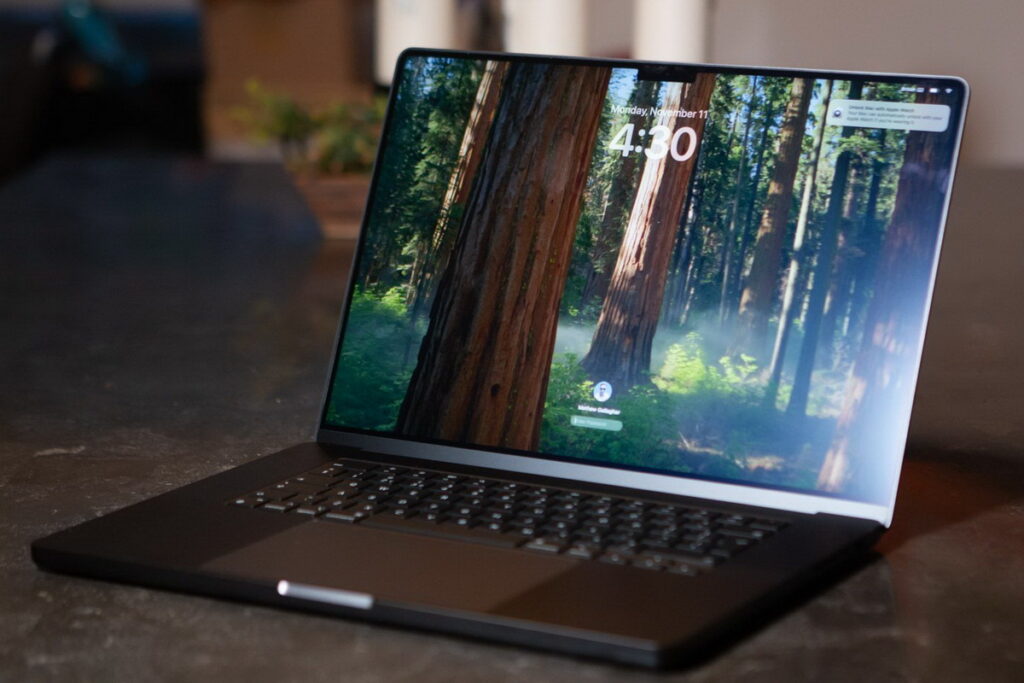
Overview
You push laptops to their limits. You edit 4K video timelines. You work with massive Photoshop files. You compile large codebases. You run virtual machines. You produce music with dozens of tracks and plugins.
For you, a regular laptop — even a MacBook Air — isn’t enough. You need the MacBook Pro.
The MacBook Pro 14-inch with M4 Pro chip is built specifically for creative professionals, developers, and power users. The M4 Pro chip delivers exceptional performance for demanding workloads — video exports finish faster, code compiles quicker, large files open instantly. The Liquid Retina XDR display is stunning — accurate colors, deep blacks, and brightness that makes HDR content look incredible. And with 24GB of RAM, even heavy multitasking stays smooth.
Yes, it’s expensive. Yes, it’s overkill for casual use. But for professionals whose income depends on their laptop’s performance, the MacBook Pro pays for itself in time saved and frustration avoided.
This isn’t a laptop for everyone. But for the people who need it, there’s nothing better.
Key Features
- Apple M4 Pro chip (12-core CPU, 16-core GPU)
- 24GB unified memory
- 512GB SSD
- 14.2-inch Liquid Retina XDR display (ProMotion 120Hz)
- Three Thunderbolt 4 ports
- HDMI port, SDXC card slot, MagSafe 3
- Professional cooling system
- Studio-quality three-mic array
- Six-speaker sound system with spatial audio
✅ PROS
- Exceptional performance for demanding creative and professional tasks – Video exports finish significantly faster. Code compiles in a fraction of the time. Large files open instantly. When your time is money, that speed pays for itself.
- Premium display quality with XDR and ProMotion – Color-accurate, incredibly bright (up to 1600 nits peak for HDR), with true blacks and a buttery-smooth 120Hz refresh rate. For photo and video work, this is one of the best laptop displays ever made.
- Reliable for long professional workflows without throttling – The cooling system keeps performance consistent during long renders and exports. No thermal throttling halfway through an important project. It just works, even when pushed hard.
- Excellent port selection – Three Thunderbolt ports, HDMI, SD card slot, and MagSafe. Connect external displays, transfer files from cameras, and charge without dongles. This is the pro connectivity people have been asking for.
- Best-in-class speakers and microphones – The six-speaker system sounds incredible for a laptop. The studio-quality mics make video calls and voice recordings sound professional.
❌ CONS
- Expensive investment compared to MacBook Air – This is not a casual purchase. You need genuine professional needs to justify the premium price tag. For everyday use, the Air is a better value.
- Overkill for casual users, students, or basic office work – If you mainly browse the web, check email, write documents, and watch YouTube, you are paying for massive amounts of performance you will literally never use. Save your money.
- Heavier and thicker than MacBook Air – The Pro is built for performance, not extreme portability. It’s heavier and thicker than the Air. If you prioritize lightness, the Air is better.
- More expensive than similarly specced Windows alternatives – You’re paying for macOS, the ecosystem, the build quality, and the display. On raw specs alone, Windows laptops offer better value.
🎯 Best For
Video editors and filmmakers – You edit 4K or 8K video regularly. You need fast exports, smooth timeline scrubbing, and a color-accurate display. The MacBook Pro delivers all of that.
Photographers and designers – You work with large RAW files, complex Photoshop documents, or design software. The M4 Pro chip and XDR display give you the performance and color accuracy you need.
Software developers – You compile large codebases, run virtual machines or containers, and need serious multitasking headroom. The MacBook Pro handles development workflows with ease.
Audio producers and musicians – You run sessions with dozens of tracks, plugins, and virtual instruments. The M4 Pro chip keeps everything running smoothly without dropouts.
Any professional whose income depends on their laptop – For you, this laptop isn’t an expense. It’s an investment in productivity. The time you save and the frustration you avoid makes the price worth it.
🧠 Why We Recommend It
The MacBook Pro M4 Pro delivers top-tier performance for serious work. If your workflow is demanding — if you routinely push laptops to their limits and feel frustrated when they can’t keep up — this machine removes that ceiling entirely.
For creative professionals, developers, and power users who need the best, the MacBook Pro is worth every dollar.
If you’re building a complete creative setup or upgrading your professional workflow, this is a great point to check what fits your needs best.
Before making your final decision, you can also explore more performance-focused options: Best Laptops Under $800: Powerful Picks Worth Buying.
Buying Guide: What to Look for in a MacBook
Choosing a MacBook means understanding the trade-offs between the Air, Neo, and Pro lines. Here’s what actually matters.
The chip is everything. The M5 in the Air is powerful for everyday use and light creative work. The A18 Pro in the Neo is capable for basic tasks. The M4 Pro in the Pro is a beast for demanding professional workloads. Match the chip to your actual needs.
Memory (RAM) matters for multitasking. 8GB is fine for basic use — browsing, email, documents. 16GB is better for multitasking and light creative work. 24GB or more is for professionals running demanding applications. On MacBooks, you cannot upgrade memory after purchase, so buy what you need upfront.
Storage is also non-upgradeable. 256GB is tight — enough for basics but fills quickly. 512GB is the sweet spot for most users. 1TB or more for professionals with large file libraries. Again, choose carefully at purchase because you can’t add more later.
Display quality varies significantly. The Air and Neo have excellent Liquid Retina displays — bright, sharp, color-accurate. The Pro has a Liquid Retina XDR display with ProMotion — significantly brighter, with true blacks and a 120Hz refresh rate. If you do color-critical work, the Pro’s display is worth the upgrade.
Portability vs. performance trade-off. The Air and Neo are thin, light, and easy to carry everywhere. The Pro is heavier and thicker but offers more performance, better cooling, and more ports. Decide which matters more for your daily life.
Battery life is excellent across all models. Even the Pro, with its powerful chip, delivers all-day battery life for most workloads. The Air and Neo last even longer. This is one of Apple’s biggest advantages over Windows laptops.
Ports matter for professionals. The Air and Neo have two Thunderbolt ports and MagSafe. The Pro adds an HDMI port and an SD card slot. If you frequently connect external displays, cameras, or multiple accessories, the Pro’s extra ports save you from carrying dongles.
FAQs
Which MacBook is best for students?
The MacBook Air M5 is the best choice for most students. It offers excellent performance for research, writing, and multitasking, with all-day battery life and lightweight portability. The Neo is a good budget alternative. The Pro is overkill unless you’re studying video editing, development, or design.
Is 8GB RAM enough on a MacBook?
For basic use — browsing, email, documents, light multitasking — yes, 8GB is sufficient. For heavier multitasking, creative work, or future-proofing, 16GB is a much better experience. For professional workloads, 24GB or more.
Should I buy MacBook Air or Pro?
Buy the Air if you do everyday tasks — writing, browsing, email, presentations, light photo editing. Buy the Pro if you do demanding creative work — video editing, 3D modeling, software development, music production — or if you need the XDR display and extra ports.
Are MacBooks worth the higher price compared to Windows laptops?
For many people, yes. MacBooks offer exceptional build quality, industry-leading battery life, best-in-class trackpads and displays, silent operation (on Air models), and seamless integration with iPhone and iPad. If you value those things, the premium is worth it. If you only care about raw specs per dollar, Windows laptops offer better value.
How long do MacBooks typically last?
MacBooks are known for longevity. With proper care, a MacBook can easily last 5-7 years and still feel reasonably fast. Many people use MacBooks for 8-10 years. That longevity helps justify the higher upfront cost.
Final Verdict
The best MacBooks for you depends entirely on your needs, your budget, and how you plan to use it.
If you want the best overall MacBook — the perfect balance of power, portability, battery life, and price — the MacBook Air 13-inch M5 stands out as the clear winner. For students, professionals, and everyday users, it’s the smartest choice Apple offers.
For budget-conscious users who want to enter the Apple ecosystem without spending over $1,000, the MacBook Neo 13-inch delivers the core Mac experience at the most accessible price. It’s perfect for students, casual users, and anyone who needs a reliable laptop for basic tasks.
For creative professionals, developers, and power users who need maximum performance, the MacBook Pro 14-inch M4 Pro is worth every dollar. The M4 Pro chip, XDR display, and professional features make it the best tool for demanding workflows.
Choosing the right MacBook comes down to your usage. Everyday tasks and portability? MacBook Air. Budget-friendly entry? MacBook Neo. Professional creative work? MacBook Pro. Match the machine to your actual needs, and you’ll be happy with your choice for years to come.
Check the latest prices and availability using the links above.
Other Articles
- Best Gaming Laptops 2026: High-Performance Gaming Machines
- Best Laptops Under $500: Affordable Options That Work
- Best Laptops Under $800: Powerful Picks Worth Buying
Disclosure: This article may contain affiliate links. If you purchase through these links, we may earn a commission at no additional cost to you.